
Zoocasa
Sold Prices
Map
Market Insights
  • Blog Home
  • For Buyers
  • For Sellers
  • Real Estate News
  • Mortgage News in Canada
  • Free Guides (PDF)
  • Real Estate Infographics
Zoocasa
  • Blog Home
  • For Buyers
  • For Sellers
  • Real Estate News
  • Mortgage News in Canada
  • Free Guides (PDF)
  • Real Estate Infographics
Home Home Improvement

How To Create An Ergonomic Home Office

Aiden Lowrie by Aiden Lowrie
August 16, 2024
in Home Improvement, Just for Fun
Reading Time: 3 mins read
Share
Tweet
Share
0 Shares

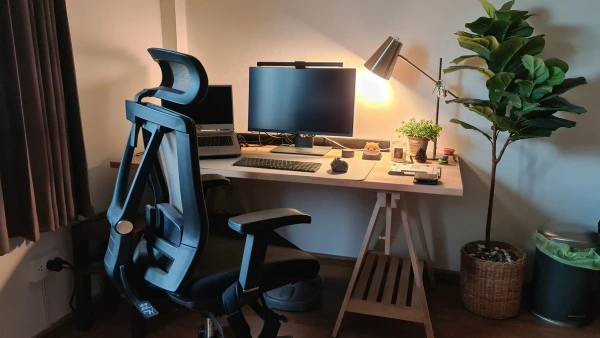
Whether you work from home, are a student, spend your free time gaming, or simply find yourself at your desk a lot, it’s likely that your set up could be more ergonomic. Try these easy adjustments to create a more comfortable and supportive home office environment.

Why Is Ergonomics Important? 

Keeping your workspace ergonomic helps keep you healthy, pain-free, and productive. Workplace ergonomics applies to how a worker interacts with their environment and with other objects during the workday, including posture and movements. Having an ergonomic workspace prevents injuries and afflictions like carpal tunnel syndrome, computer vision, and back/neck issues. 

Desk Chair 

Choose a desk chair that is built to be ergonomic, or add a seat pad and backrest to your existing chair. An ergonomic chair facilitates back support, reduces hip pressure and pain, and increases blood movement. A good chair also keeps you at the right level to your computer to prevent neck pain and eye strain. Typically, this means your feet are flat on the floor, your thighs are parallel to the ground, and your knees are at a 90-degree angle. This height aligns your eyes with the top of yoru computer monitor, allowing you to maintain proper posture. 

  • Read: Home Sweet Office: Remote Work’s Impact on Canadian Real Estate 

Correct Desk and Monitor Height 

In addition to an ergonomic desk chair keeping you at the right level to your monitor, the proper desk and monitor height also helps. A monitor riser or adjustable arm can help you avoid bending your head and neck to view the screen. Set the screen’s top line to be at or just below eye level. To avoid headaches and eye strain, position your monitor at least an arm’s length away from you. To raise your monitor so you aren’t straining to gaze down at it, a monitor arm can be a useful addition.

For brief moments, it can be useful to look down at a laptop. On the other hand, using a laptop for extended periods of time can eventually cause neck and back pain. Use an external keyboard and mouse and mount your laptop on a laptop riser for a long-term configuration. As an alternative, you can elevate your laptop’s height by setting it on sturdy objects like books.

  • Read: How to Make an Outdoor Workspace This Summer

Keyboard and Mouse 

An ergonomic keyboard and mouse are great investments if you spend a lot of time at the computer, however your current keyboard, if used properly, can be just as good. 

The mouse should be angled to maintain your arms at a 90-degree angle or less. Your wrists should not be bent up or down; instead, they should be in a neutral position. It is best to position your keyboard slightly below elbow height. It should lie flat on your desk or slope softly in the other direction. Use of a keyboard tray is something to think about if you have trouble getting your keyboard to sit at the proper height. You can avoid constantly shifting your keyboard when you use a tray.

Are you looking to enter the real estate market this summer? Give us a call today! One of the experienced agents at Zoocasa will be more than happy to help you through the exciting home-buying process! 

Looking for your dream home?
Contact us today to talk to a Realtor in your area
Previous Post

July Sees Slow Movement While Prices Shift Across Canada’s Real Estate Market: CREA

Next Post

10 Cities in Canada to Avoid if You Hate Traffic

Aiden Lowrie

Aiden Lowrie

A Zoocasa Content Marketing Assistant, Aiden Lowrie gets to blend her love of writing with her love of all things real estate and marketing as a blog contributor. She loves to find niche spots in and around the GTA to explore, or find ways to make the most out of your space. Outside of work and blogging, Aiden enjoys being outside in the sunshine, patios with friends and family, and working on her own blog. Connect with Aiden to read more of her articles and insights!

Related Posts

new years eve dinner
Holiday Activites

5 New Year’s Eve Ideas For at Home to Welcome 2026 in Style

December 9, 2025
waterfront town
Just for Fun

7 Refreshing Waterfront Towns to Explore in New York

December 7, 2025
holiday party
Holiday Activites

6 Holiday Party Ideas: How to Prep Your Home for Festive Entertaining

December 5, 2025

Blog Search

No Result
View All Result

Newsletter Sign-up

Join a community of 130,000+ subscribers. Don't miss important real estate news, market data, and buying and selling tips.

Recent Articles

A luxury home covered in snow.

The Bank of Canada Locks In a Rate Hold to End 2025

December 10, 2025
An old car in front of an old home.

Why the “Good Ole Days” of Housing Are Gone: Tracking Affordability From 1965 to 2025

December 10, 2025
new years eve dinner

5 New Year’s Eve Ideas For at Home to Welcome 2026 in Style

December 9, 2025
Mom and child moving rug

The Best Markets in Canada to Buy and Sell Before 2026

December 8, 2025

Featured Listings

cabin home

6 of the Smallest and Coziest Homes Currently for Sale

November 20, 2025
luxury home

3 of the Most Expensive Homes in Canada for Sale Right Now 

November 6, 2025
historic home

8 Historic Homes in America’s Spookiest Cities

October 31, 2025
family reading a book

6 Homes Near the Top 3 School Districts in the U.S.

October 24, 2025
first-time home buyer programs and rebates

Social Media

250 The Esplanade Suite 408 Toronto, ON M5A 4J5

Stay Connected

  • Blog Home
  • For Buyers
  • For Sellers
  • Real Estate News
  • Mortgage News in Canada
  • Free Guides (PDF)
  • Real Estate Infographics
No Result
View All Result

Zoocasa © 2007–2022. The trademarks MLS®, Multiple Listing Service® and the associated logos are owned by The Canadian Real Estate Association (CREA) and identify the quality of services provided by real estate professionals who are members of CREA.